
Have you ever wished your BMW’s side mirrors could fold automatically every time you park? It’s a small feature that makes a big difference—protecting your mirrors from damage and saving you time.
If you’re tired of folding them manually or worrying about scratches in tight spaces, learning how to auto fold BMW mirrors is the game changer you need. In this guide, you’ll discover simple steps to activate this smart feature, so your car takes care of itself while you focus on what matters most.
Ready to make your driving experience smoother and smarter? Let’s dive in.
Benefits Of Auto Folding Mirrors
Auto folding mirrors help you protect your BMW’s side mirrors. They fold in automatically when you park or lock the car.
This feature adds convenience and safety. It saves space and reduces the risk of damage.
Space Saving In Tight Areas
Auto folding mirrors make parking in small spaces easier. They fold the mirrors close to the car body.
This helps avoid hitting nearby objects or vehicles. It is useful in narrow parking spots or crowded streets.
Protection From Damage
Folded mirrors reduce the chance of damage from passing cars or pedestrians. They stay safe from scratches and knocks.
This saves you from costly repairs. It also keeps your BMW looking new longer.
Enhanced Convenience
Auto folding mirrors work without manual effort. They fold and unfold automatically with your car’s locking system.
This convenience saves time. You do not have to remember to fold them each time.
Checking Mirror Folding Compatibility
Before setting up auto folding for your BMW mirrors, check if your car supports this feature. Not all BMW models have auto fold mirrors installed.
Look for a mirror folding button inside your car or check the owner’s manual. This helps you know if auto folding is available or if you need an upgrade.
Bmw Models With Auto Fold Feature
Many newer BMW models come with auto folding mirrors as a standard or optional feature. This helps protect mirrors in tight parking spaces.
Some BMW models known for having auto fold mirrors include:
- BMW 3 Series (F30 and later)
- BMW 5 Series (G30 and later)
- BMW X3 (G01 and later)
- BMW X5 (G05 and later)
- BMW 7 Series (G11 and later)
Manual Vs. Automatic Folding Options
Manual folding means you fold the mirrors by hand. This is simple but takes time and effort. Automatic folding uses motors to fold mirrors when you lock or unlock the car.
Automatic folding is more convenient and helps avoid damage. Manual folding is cheaper but less practical for frequent use.
- Manual folding: fold by hand, no power needed
- Automatic folding: folds with car locking or button press
- Automatic folding may need special wiring or modules
- Manual folding works on all models but offers less protection
Activating Auto Fold Mirrors Via Idrive
Auto folding mirrors protect your BMW’s side mirrors when parked. You can turn this feature on using the iDrive system. This guide shows you how to activate it step-by-step.
Follow the instructions carefully to make sure your mirrors fold automatically when you lock your car.
Navigating The Idrive Menu
First, turn on your BMW and press the iDrive controller to open the main menu. Use the controller knob to scroll through the options. Look for the “Car” or “Vehicle Settings” section. Select it by pressing the controller down.
- Press the iDrive controller to open the main menu.
- Scroll to “Car” or “Vehicle Settings”.
- Press the controller to select the option.
- Find the “Mirrors” settings inside this menu.
Enabling Mirror Auto Fold Settings
Inside the “Mirrors” settings, you will see an option called “Auto Fold Mirrors” or similar. Select this option to open the settings. You can then turn the feature on or off. Make sure to save your settings before exiting the menu.
| Setting | Description | Action |
| Auto Fold Mirrors | Folds mirrors when locking the car | Turn On/Off |
| Unlock Mirror Position | Restores mirror position when unlocking | Turn On/Off |
| Mirror Adjustment | Adjust mirror angles manually | Use controller |
Using The Key Fob To Fold Mirrors
Many BMW models allow you to fold the side mirrors using the key fob. This feature helps protect your mirrors in tight parking spaces. It also makes your car look neat when parked.
You can fold or unfold the mirrors remotely without touching the car. This guide explains how to use the lock and unlock buttons and how to customize these settings.
Folding Mirrors With Lock/unlock Buttons
To fold the mirrors using the key fob, press and hold the lock button. Hold it for about two seconds until the mirrors start folding. This works on most BMW models with this feature.
To open the mirrors again, press and hold the unlock button. The mirrors will unfold automatically. This is useful when you arrive at your car and want the mirrors ready to drive.
- Press and hold the lock button to fold mirrors
- Press and hold the unlock button to unfold mirrors
- Hold buttons for about two seconds until mirrors move
Customizing Key Fob Settings
You can change how your BMW reacts to the key fob. Use the iDrive system to set if the mirrors fold automatically when locking or unlocking.
In the iDrive menu, go to the vehicle settings. Find the mirror section and look for folding options. Turn on automatic folding if you want mirrors to fold when you lock the car.
- Access iDrive vehicle settings
- Locate mirror folding options
- Enable or disable automatic folding on lock/unlock
- Save settings before exiting the menu
Manual Folding Methods
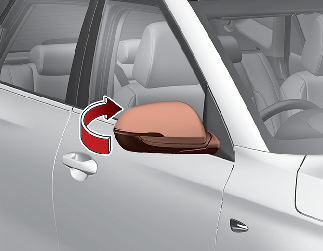
Folding BMW mirrors by hand is a simple way to protect them from damage. You do not need any tools or electronics. This method is useful if your car does not have auto-folding mirrors.
Manual folding can save space in tight parking spots. It also helps prevent scratches and knocks while parked. Let’s look at how to fold mirrors safely and when you should do it.
Folding Mirrors By Hand Safely
Always fold the mirrors gently to avoid breaking the mechanism. Use your hand to push the mirror toward the car body. Do not force it if it feels stuck. Check for any dirt or ice that might block the movement before folding.
- Hold the mirror firmly but gently
- Push slowly toward the car door
- Stop if you feel resistance
- Clear any obstacles before folding
- Unfold mirrors carefully before driving
When To Use Manual Folding
Manual folding is best in these situations:
| Situation | Reason |
| Narrow Parking Space | Prevents mirror damage from other cars |
| Car Without Auto Fold | Only way to protect mirrors |
| Cold Weather | Ice may block auto folding |
| Manual Control Preference | Some drivers prefer manual folding |
Credit: www.aliexpress.com
Troubleshooting Auto Fold Issues
Many BMW owners enjoy the convenience of auto-folding mirrors. Sometimes, these mirrors might not work as expected.
This guide will help you identify common problems and provide simple fixes. Learn how to reset your mirror functions easily.
Common Problems And Fixes
Auto-folding mirrors can face issues. These can range from a simple obstruction to more complex electrical problems.
- Check if there is any physical obstruction.
- Verify if the mirror switch is set correctly.
- Inspect the mirror for any visible damage.
Resetting Mirror Functions
Resetting the mirror functions can solve many issues. Follow these steps if your mirrors do not auto-fold.
- Enter your BMW and close all doors securely.
- Turn the ignition to the on position without starting the engine.
- Press and hold the mirror fold button for 10 seconds.
- Release the button and turn off the ignition.
- Restart your car to check if the mirrors reset properly.
Aftermarket Options For Auto Folding
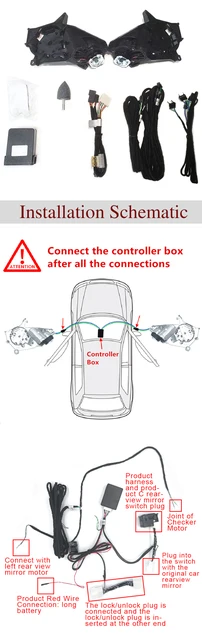
Auto folding mirrors add convenience and style to your BMW. You can install them with aftermarket kits.
These kits allow mirrors to fold automatically when you lock your car. They can also unfold when you unlock the vehicle.
Installing Auto Fold Kits
First, check if your BMW model supports these kits. Some cars may need extra parts.
Follow the instructions in the kit carefully. You might need basic tools like screwdrivers and pliers.
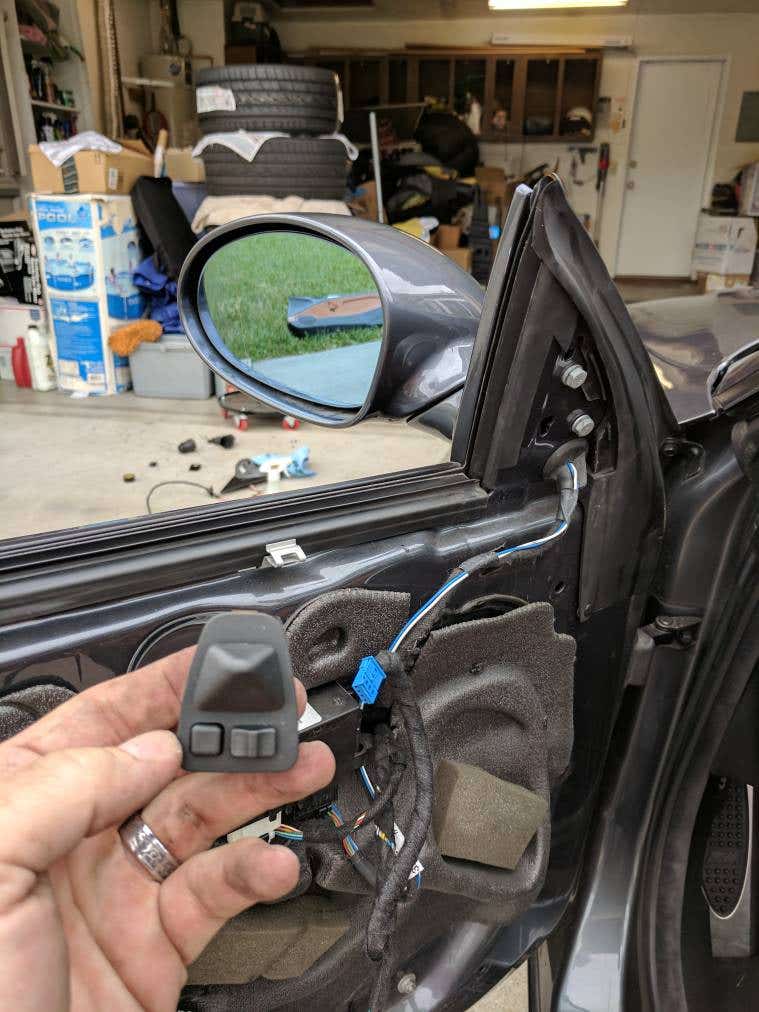
- Locate the mirror control module
- Connect the wiring as per the guide
- Test the functionality before final assembly
Cost And Warranty Considerations
The cost of aftermarket kits varies. Check different brands for price comparisons.
Warranties are important to consider. Some brands offer limited warranties on their products.
| Brand | Cost | Warranty |
| Brand A | $150 | 1 year |
| Brand B | $200 | 2 years |
Credit: ownersmanual.kia.com
Credit: www.e46fanatics.com
Frequently Asked Questions
How Do I Enable Auto Fold On Bmw Mirrors?
To enable auto fold, access your BMW’s iDrive settings. Navigate to ‘Vehicle Settings’, then ‘Exterior Mirrors’. Select ‘Auto Fold’ or ‘Comfort Access’ to activate automatic folding when locking or unlocking your car.
Can I Auto Fold Bmw Mirrors With A Key Fob?
Yes, many BMW models allow mirror auto folding via the key fob. Press and hold the lock button to fold mirrors automatically. This feature works if auto fold is enabled in your vehicle’s settings.
Which Bmw Models Support Auto Folding Mirrors?
Most recent BMW models, including 3 Series, 5 Series, X3, and X5, support auto folding mirrors. Check your owner’s manual or iDrive system to confirm if your specific model has this feature.
Is Manual Folding Necessary If Auto Fold Is Enabled?
Manual folding isn’t necessary once auto fold is activated. However, you can still fold mirrors manually for tight spaces or car washes. Auto fold offers convenience but does not disable manual control.
Conclusion
Auto folding BMW mirrors add comfort and protect your car. The process is simple and saves time daily. Adjust settings carefully to avoid any damage. Regular use keeps mirrors safe in tight spaces. Enjoy the convenience of automatic folding every time you park.
This small feature makes a big difference in your driving experience. Try it out and see how easy it is to use. Your BMW will feel smarter with this handy option.