
Are you tired of struggling to connect your phone to your car? Choosing the right cable for Android Auto can make all the difference.
Using the wrong cable may cause slow charging, poor connection, or even no connection at all. But don’t worry—this guide will help you find the perfect cable that fits your needs and keeps your phone connected smoothly every time you drive.
Keep reading to discover exactly what type of cable works best for Android Auto and how to avoid common mistakes that could ruin your experience.
Cable Types For Android Auto
Android Auto requires a compatible cable to connect your phone to your car. The cable type affects connection quality and charging speed.
Choosing the right cable helps avoid connection problems and ensures smooth operation of Android Auto features.
Usb-c Vs Micro-usb
Most new Android phones use USB-C ports. Older devices might still use Micro-USB. USB-C cables offer faster data transfer and charging.
- USB-C cables have a reversible connector for easy plugging.
- Micro-USB cables only fit one way and are slower.
- USB-C supports higher power for faster charging.
- Micro-USB is less common in new devices.
Lightning Compatibility
Lightning cables are designed for Apple devices, not Android phones. Android Auto does not support Lightning cables.
Using a Lightning cable with Android Auto will not work. Make sure to use USB-C or Micro-USB depending on your phone.
Quality Differences
| Feature | High-Quality Cable | Low-Quality Cable |
| Data Transfer Speed | Fast and stable | Slow or unstable |
| Charging Speed | Supports fast charging | Slow charging |
| Durability | Strong and long-lasting | Breaks easily |
| Compatibility | Works with Android Auto | May cause connection issues |
Fast Charging Standards
Choosing the right cable affects how fast your Android Auto charges. Fast charging standards ensure your device fills power quickly and safely. Understanding these standards helps pick the best cable for your car setup.
Not all cables support the latest fast charging protocols. Some cables transfer data only, while others handle power delivery. Let’s explore key fast charging protocols and compatible chargers.
Quick Charge Protocols
Quick Charge (QC) is a popular fast charging technology made by Qualcomm. It boosts charging speed by raising voltage and current safely. Different versions improve speed and compatibility.
- QC 2.0 supports charging up to 18W with variable voltage.
- QC 3.0 adds flexible voltage steps for better efficiency.
- QC 4.0 and 4+ improve thermal control and charging safety.
- QC 5 supports up to 100W for ultra-fast charging devices.
Power Delivery Features
USB Power Delivery (PD) is a universal fast charging standard. It works with many devices, including Android phones and Android Auto systems. PD adjusts voltage and current for safe, fast charging.
| Feature | Description |
| Voltage Range | 5V to 20V |
| Maximum Power | Up to 100W |
| Communication | Device and charger negotiate power level |
| Compatibility | Works with many brands and devices |
Compatible Chargers
Choosing a compatible charger ensures fast charging works well with Android Auto. Chargers must support QC or PD standards. Using low-quality chargers may slow charging or cause issues.
- Look for chargers labeled with Quick Charge or USB PD.
- Check the output power rating; 18W or higher is best.
- Use cables that support fast charging protocols.
- Prefer chargers with built-in safety features.
Cable Length And Durability
Choosing the right cable for Android Auto is important. The cable must be the correct length and strong enough to last.
This guide explains key points about cable length and durability to help you pick the best one.
Optimal Length Choices
The cable length affects comfort and convenience. Too short cables limit movement. Too long cables create clutter.
- 1 meter (3 feet) is good for close connections.
- 1.5 meters (5 feet) offers more freedom in the car.
- 2 meters (6 feet) or longer works if you sit far from the USB port.
Material Quality
Strong materials help cables last longer. Look for cables with thick insulation and solid connectors.
| Material | Benefits |
| Nylon Braided | Resists wear and tear, flexible |
| Rubber Coated | Good grip, protects from bending |
| Aluminum Connectors | Durable and prevents corrosion |
Tangle Resistance
Tangled cables waste time and cause damage. Choose cables designed to resist tangling for easy use.
- Flat cables reduce knots and twists.
- Braided cables keep their shape better.
- Shorter cables tangle less.

Credit: www.amazon.ca
Data Transfer Speeds
Choosing the right cable for Android Auto affects how well it works. Data transfer speed is key. Faster cables help send information smoothly between your phone and car.
Two common cable types are USB 2.0 and USB 3.0. Each offers different speeds and performance. Let’s look at how they compare and what impact they have on Android Auto.
Usb 2.0 Vs Usb 3.0
USB 2.0 cables can transfer data up to 480 Mbps. USB 3.0 cables offer much higher speeds, up to 5 Gbps. This speed difference affects how fast your phone and car communicate.
- USB 2.0:Lower speed, widely compatible, less costly.
- USB 3.0:Faster speed, newer technology, improved performance.
Impact On Android Auto Performance
Faster cables allow better video and audio quality. They reduce lag and improve response times. USB 3.0 cables can handle more data at once, which helps with navigation and voice commands.
| Feature | USB 2.0 | USB 3.0 |
|---|---|---|
| Max Speed | 480 Mbps | 5 Gbps |
| Video Quality | Standard | High |
| Audio Quality | Good | Better |
| Response Time | Slower | Faster |
| Compatibility | Universal | Newer Devices |
Choosing The Right Cable
Using the right cable is important for Android Auto. It helps keep your connection stable and fast.
Not all cables work well with Android Auto. You need one that supports data transfer and power at the same time.
Brand Recommendations
Some brands make cables that work well with Android Auto. Choosing a trusted brand can avoid connection problems.
Look for brands known for quality USB-C or USB-A cables. These often last longer and transfer data better.
- Anker
- Aukey
- Belkin
- Amazon Basics
- Nomad
Price Vs Performance
Cheap cables may not charge or transfer data well. They can cause slow or lost connections.
Mid-range cables usually give the best value. They balance cost with good quality and durability.
| Price Range | Performance | Durability |
|---|---|---|
| Low ($5-$10) | Unstable connection | Short lifespan |
| Mid ($10-$20) | Good connection | Lasts months to years |
| High ($20+) | Excellent connection | Very durable |
User Reviews
User reviews help find cables that work well in real life. Many users share their experience about cable quality and performance.
Check for comments about fast charging and reliable Android Auto connection. Avoid cables with many reports of disconnects.
- Look for cables with high ratings and many reviews
- Read about cable length and flexibility
- Pay attention to warranty and customer service
Credit: www.reddit.com
Common Issues And Fixes
Many drivers use Android Auto for navigation and music. The right cable is key for a good connection. Problems can arise if the cable is not perfect.
This guide helps solve common cable issues with Android Auto. Learn how to fix connection troubles, charging stops, and cable wear.
Connection Problems
Connection issues are often due to faulty cables. A bad cable can stop Android Auto from working.
- Ensure the cable is not damaged
- Use a USB cable that supports data transfer
- Try a shorter cable for a stable connection
Charging Interruptions
Charging can stop if the cable is wrong. This can lead to a drained battery while using Android Auto.
| Problem | Solution |
| Slow charging | Switch to a high-quality cable |
| Charging stops | Check the USB port for debris |
| Not charging | Ensure the cable is securely connected |
Cable Wear And Tear
Cables wear out over time. This can cause Android Auto to disconnect frequently.
Credit: www.newegg.com
Frequently Asked Questions
What Type Of Cable Works Best For Android Auto?
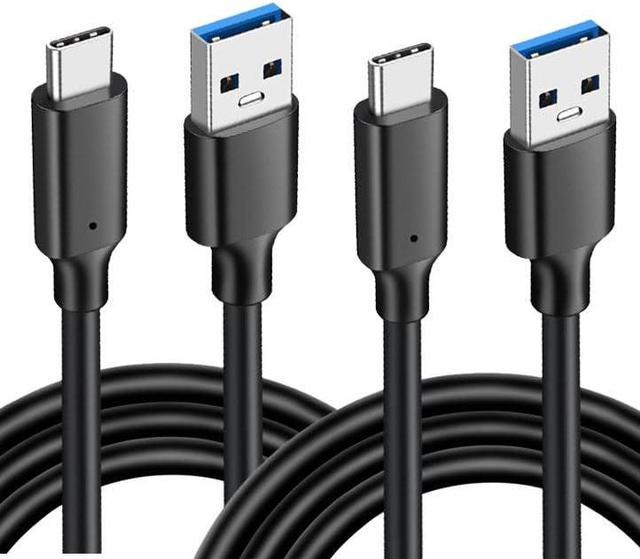
A high-quality USB-C to USB-A or USB-C to USB-C cable works best. It ensures stable data transfer and charging, providing seamless Android Auto connectivity and performance.
Can Any Usb Cable Support Android Auto?
No, not all USB cables support Android Auto. Use a cable that supports data transfer, not just charging, to maintain a reliable connection.
Is Usb-c Cable Necessary For Android Auto?
USB-C is preferred for newer phones and faster data transfer. However, some Android Auto setups still support micro-USB cables depending on your device.
How Long Should The Android Auto Cable Be?
A cable length of 3 to 6 feet is ideal. This length offers convenience without signal loss or clutter in your car.
Conclusion
Choosing the right cable ensures a smooth Android Auto experience. Use a high-quality USB cable with fast data transfer. Avoid cheap or damaged cables to prevent connection issues. A good cable keeps your phone charged while driving. Remember, not all cables work equally well with Android Auto.
Pick one that fits your phone’s port and supports data. This small step makes your drive safer and more enjoyable. Simple and reliable cables bring the best Android Auto performance.