Are you tired of your Android Auto connection dropping or your phone charging slowly while driving? The right USB cable can make all the difference in your daily drive.
Choosing the best USB cable for Android Auto isn’t just about plugging in—it’s about smooth, reliable performance every time you hit the road. You’ll discover exactly what features to look for and which cables deliver the best experience. Keep reading to find the perfect match for your needs and say goodbye to frustrating connection issues for good.
Key Features For Android Auto Cables
Choosing the right USB cable for Android Auto is important for smooth use. The cable affects how fast data moves and how well your phone charges.
This guide explains key features to look for in USB cables that work with Android Auto.
Data Transfer Speeds
Fast data transfer is needed for Android Auto to work without delays. The cable must support high transfer rates to send audio, video, and app data quickly.
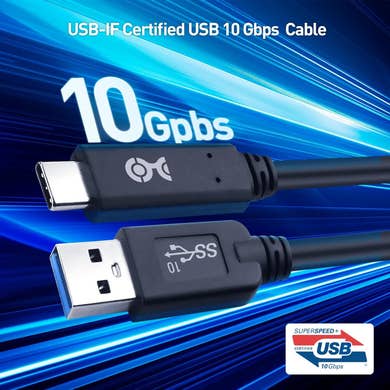
Look for cables that support USB 3.0 or higher. These can transfer data up to 5 Gbps or more, which is good for Android Auto.
Charging Capability
The cable should charge your phone while using Android Auto. A cable with good charging ability keeps your device powered on long trips.
- Supports fast charging standards like Quick Charge or USB Power Delivery
- Delivers at least 2 amps of current for steady charging
- Maintains stable power without overheating
Cable Durability
A durable cable lasts longer and stands up to daily use. Strong materials prevent damage from bending or pulling.
| Feature | Benefit |
| Nylon Braided Jacket | Prevents fraying and tangling |
| Reinforced Connectors | Stops breaking at connection points |
| Thick Wiring | Improves power and data flow |
Connector Types
Android Auto cables use different connector types depending on your device and car system. The right connector ensures a secure fit and good signal.
- USB-C to USB-A: Standard for many phones and cars
- USB-C to USB-C: Faster and newer devices use this
- Micro USB to USB-A: Older Android phones need this
Types Of Usb Cables
Choosing the right USB cable is important for Android Auto. Different cables offer different speeds and compatibility.
Here we will look at three common types of USB cables used with Android Auto and their features.
Usb-a To Usb-c
This cable has a USB-A connector on one end and USB-C on the other. It is common for older cars with USB-A ports.
- USB-A is the larger, rectangular connector.
- USB-C is smaller and reversible.
- Supports charging and data transfer.
- Speeds can vary based on cable quality.
Usb-c To Usb-c
This cable has USB-C connectors on both ends. It is common in newer phones and cars.
| Feature | Description |
|---|---|
| Connector Type | USB-C on both ends |
| Data Speed | Fast, supports USB 3.1 or higher |
| Charging | Supports fast charging |
| Compatibility | Newer Android phones and cars |
Micro Usb Options
Micro USB cables have a smaller, older connector. Some older Android phones still use this type.
- Usually USB-A to Micro USB cable.
- Slower data transfer compared to USB-C.
- Less common in newer Android Auto setups.
- May need adapters for newer car USB ports.
Compatibility With Android Devices
Choosing the best USB cable for Android Auto depends on your device compatibility. Not all cables work well with every Android phone.
A good cable must support fast data transfer and power delivery. This ensures a smooth connection between your phone and car system.
Device Requirements
Your Android phone must meet certain requirements to use Android Auto properly. These rules help the system work without issues.
- Android 6.0 (Marshmallow) or higher is needed.
- Phone must have a USB port that supports data transfer.
- USB cable must be USB 2.0 or higher for good speed.
- Phone should have enough battery or be charging during use.
Android Auto App Needs
The Android Auto app needs to be installed and updated for the best experience. It manages the connection between your phone and car.
The USB cable should allow both charging and data transfer. This helps the app work without interruptions.
- Use a cable that supports fast data transfer speeds.
- Choose cables with strong connectors to avoid loose connections.
- Longer cables may reduce signal quality; keep cables short if possible.
- Check that the cable supports both charging and data transfer.

Credit: www.amazon.com
Top Brands And Models
Choosing the right USB cable for Android Auto helps ensure a smooth connection. Quality cables support fast data transfer and charging. This guide covers top brands and models for Android Auto use.
We divided the options into premium and budget-friendly choices. Each section highlights key features and reliable models.
Premium Choices
Premium cables offer durable build and fast charging speeds. They use high-quality materials to last longer and provide stable connections.
| Brand | Model | Key Features | Price Range |
|---|---|---|---|
| Anker | Powerline+ II | Reinforced cable, fast charging, USB-C to USB-A | High |
| BELKIN | Boost↑Charge USB-C | Durable nylon braided, fast sync and charge | High |
| Aukey | CB-D20 | Aluminum connectors, supports high-speed data | Medium-High |
Budget-friendly Options
Budget cables offer good performance at lower prices. They are great for everyday use but may have shorter lifespans.
- AmazonBasics USB-C Cable – Affordable, reliable for data and charging
- UGREEN USB Cable – Nylon braided, good durability for budget
- JSAUX USB Cable – Supports fast charging, decent build quality
Tips For Choosing The Right Cable
Choosing the best USB cable for Android Auto makes your driving safer and easier. The right cable ensures fast data transfer and reliable charging.
Consider factors like length, build quality, and warranty before buying a cable. These tips help you pick one that works well with your car and phone.
Length Considerations
The cable length affects how you connect your phone to the car. A cable that is too short may limit your phone’s placement. A cable that is too long can be messy and get in the way.
- Choose a cable between 3 to 6 feet for easy reach.
- Longer cables may slow charging and data transfer.
- Short cables keep your car interior neat and tidy.
- Consider your car’s USB port location for the right length.
Build Quality
Good build quality means the cable lasts longer and works better. Look for strong connectors and thick, flexible wires. These features prevent breaks and wear from daily use.
| Feature | Benefit |
| Reinforced connectors | Resist bending and breakage |
| Thick cable jacket | Protects internal wires |
| Flexible material | Easy to coil and store |
| Gold-plated contacts | Improve signal quality |
Warranty And Support
A warranty shows the maker trusts their product. It protects you if the cable breaks or stops working early. Good customer support helps solve problems fast.
- At least one year of coverage
- Easy return or replacement process
- Responsive customer service
- Clear warranty terms

Credit: www.powerpeak.com
Common Issues And Troubleshooting
Finding the best USB cable for Android Auto can be tricky. You might face issues with connection and charging. Let’s explore these problems and how to solve them.
This guide covers common USB cable issues. Learn how to fix them and keep Android Auto running smoothly.
Connection Problems
Connection issues with USB cables are frustrating. They disrupt your Android Auto experience. Ensure your cable is compatible and in good condition.
- Check if the cable is certified for data transfer.
- Ensure the cable length is not too long.
- Test the cable with another device.
Charging Failures
Charging issues can occur with USB cables. This affects your phone’s battery life. Use a high-quality cable to avoid this.
| Problem | Solution |
| Slow charging | Use a cable with higher amperage |
| No charging | Check the cable for physical damage |
| Intermittent charging | Ensure the cable is properly connected |
Cable Wear And Tear
Over time, cables suffer wear and tear. This can lead to poor performance. Regular checks can help prolong cable life.

Credit: www.amazon.com
Frequently Asked Questions
What Type Of Usb Cable Works Best For Android Auto?
A USB Type-C to USB-A or USB-C cable works best. It ensures fast data transfer and stable connection. Choose cables with USB 3. 0 or higher for optimal performance. Avoid cheap cables to prevent connectivity issues.
How Long Should My Android Auto Usb Cable Be?
A cable length between 3 to 6 feet is ideal. It offers enough flexibility without excessive slack. Longer cables may cause signal loss or slower charging. Choose a length suitable for your car’s interior layout.
Is Usb-c Better Than Micro Usb For Android Auto?
Yes, USB-C is better because it supports faster data and charging speeds. It also offers reversible plug orientation for easier use. Most modern Android phones and cars support USB-C for Android Auto.
Can Any Usb Cable Support Android Auto?
Not all USB cables support Android Auto. The cable must handle both data transfer and charging. Cheap or charging-only cables may fail to connect properly. Always use high-quality, data-capable cables for Android Auto.
Conclusion
Choosing the right USB cable improves your Android Auto experience. A good cable ensures fast data transfer and stable connection. Avoid cheap cables that may cause interruptions or slow charging. Look for cables with strong build quality and good reviews.
A reliable cable helps keep your phone connected safely on the road. Simple and durable cables work best for everyday use. Remember, a quality USB cable makes driving with Android Auto easier and safer.