
Imagine driving on a long highway with less stress and more comfort. That’s exactly what auto cruise control can do for you.
If you’ve ever felt tired from constantly adjusting your speed or worried about keeping a safe distance from other cars, this feature can change your driving experience. You’ll learn how to use auto cruise control easily and safely. By the end, you’ll feel confident to take control of your car’s speed without breaking a sweat.
Keep reading to discover tips that will make your next drive smoother and more relaxing.
Credit: www.chase.com
Auto Cruise Control Basics
Auto cruise control helps drivers maintain a steady speed without pressing the gas pedal. It makes driving easier on highways and long trips.
This technology can improve comfort and reduce fatigue. Understanding how it works is important for safe use.
What Is Auto Cruise Control
Auto cruise control is a system that keeps your car at a set speed automatically. It uses sensors and computers to adjust the throttle and brakes. This lets you relax your foot while driving.
Types Of Cruise Control Systems
There are different kinds of cruise control systems. Each type offers unique features and levels of automation.
- Standard Cruise Control:Maintains a fixed speed set by the driver.
- Adaptive Cruise Control:Adjusts speed to keep a safe distance from the car ahead.
- Dynamic Cruise Control:Can slow down and speed up based on traffic conditions.
- Stop-and-Go Cruise Control:Handles traffic jams by stopping and starting automatically.
Key Components Involved
| Component | Function |
|---|---|
| Speed Sensor | Measures the current speed of the vehicle. |
| Radar/Lidar Sensors | Detects distance and speed of vehicles ahead. |
| Throttle Control | Adjusts engine power to maintain speed. |
| Brake System | Slows down the car when needed. |
| Control Unit | Processes sensor data and controls the system. |
Setting Up Auto Cruise Control
Auto cruise control helps keep your car moving at a steady speed. It makes driving easier on highways.
Before using it, you need to set it up properly. This guide explains how to activate and adjust it.
Activating The System
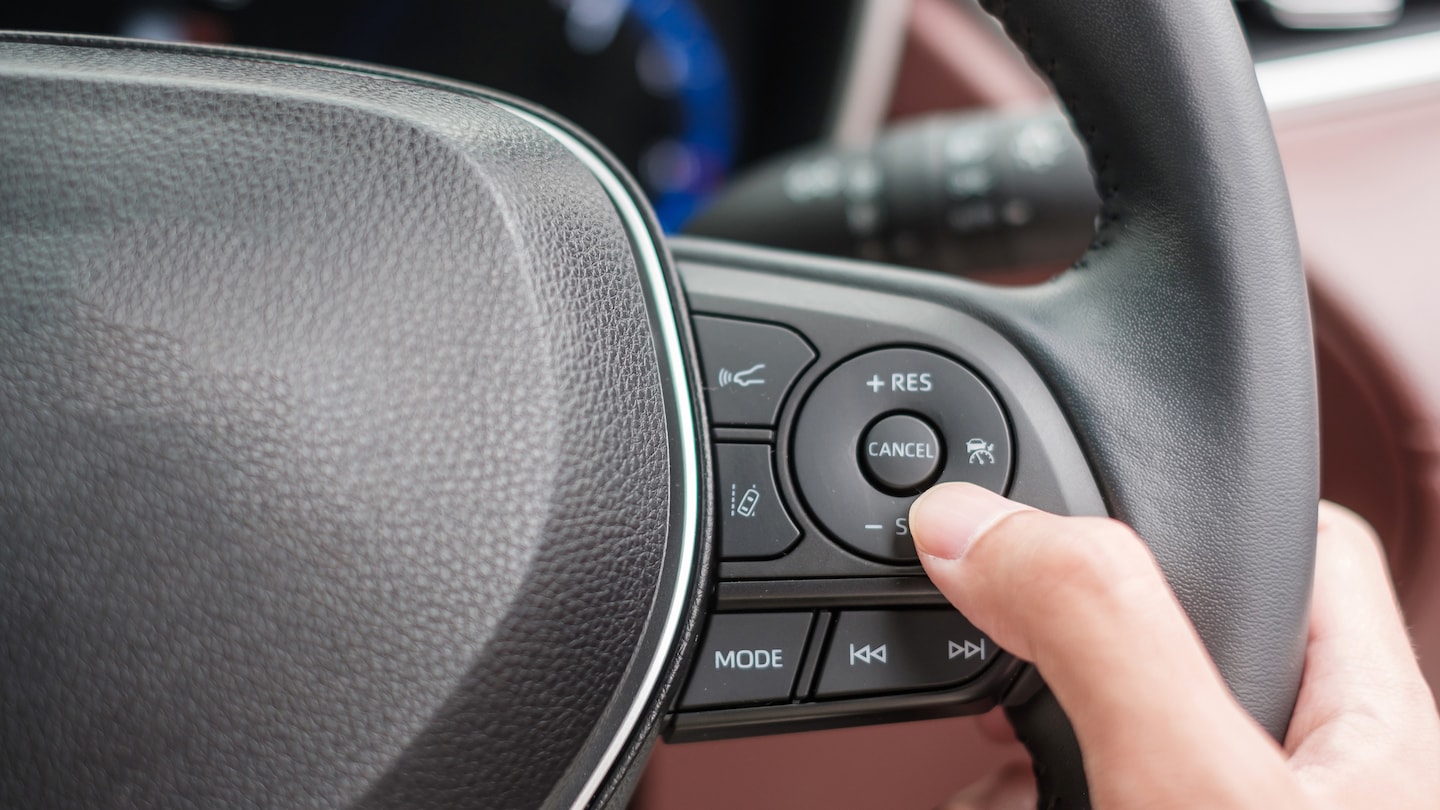
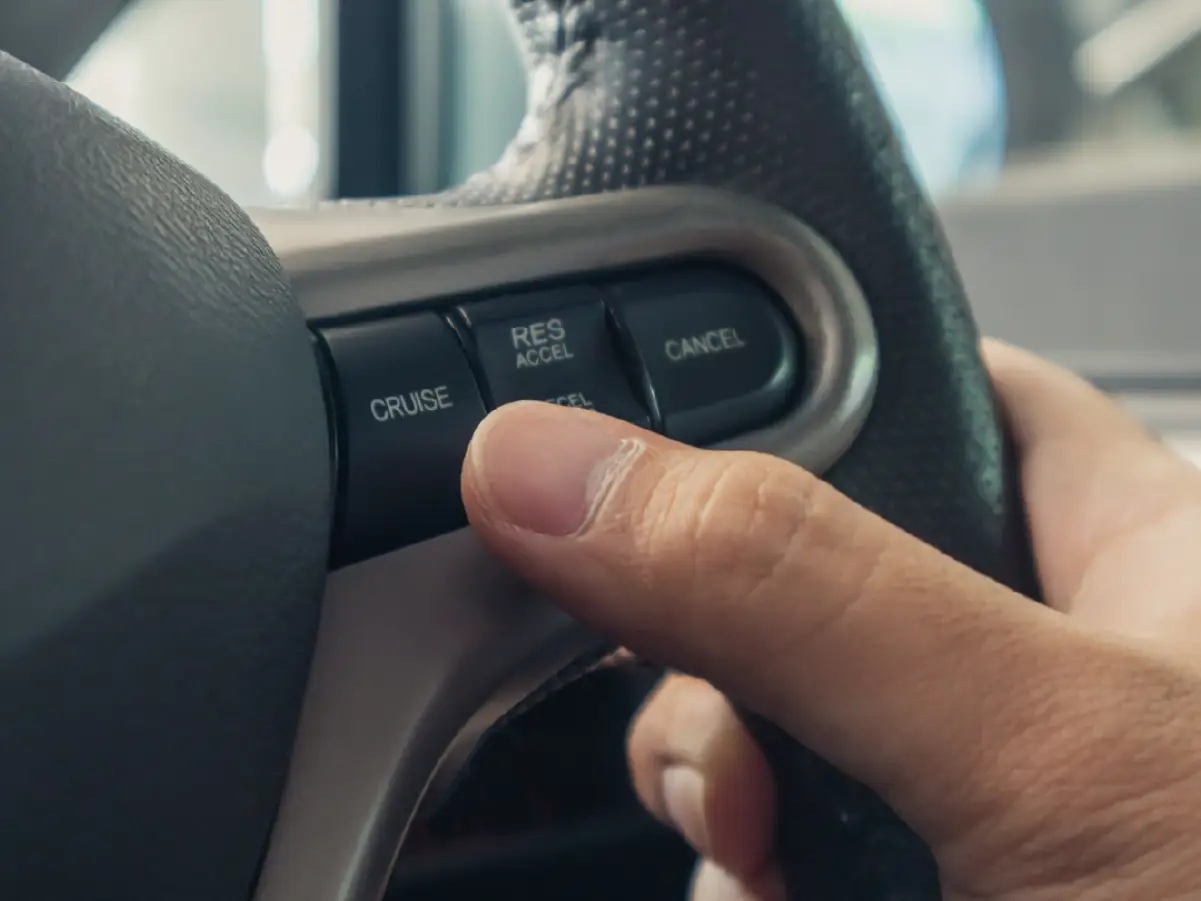
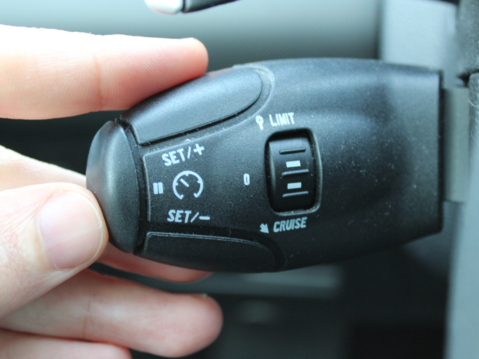
Turn on your car and find the cruise control button. It is usually on the steering wheel or stalk.
Press the button to activate the system. A light or icon will show on the dashboard when it is ready.
Adjusting Speed Settings
Drive at the speed you want to keep. Press the “set” button to save this speed.
Use the “+” or “-” buttons to increase or decrease your speed in small steps.
- Press “+” to speed up
- Press “-” to slow down
- Use “cancel” to pause the system
Maintaining Safe Following Distance
Auto cruise control can keep a safe distance from cars ahead. Check your car’s settings for distance options.
Choose a distance that fits your driving style and road conditions. This helps avoid crashes.
- Short distance for light traffic
- Medium distance for normal traffic
- Long distance for heavy traffic or bad weather
Driving Techniques With Auto Cruise
Auto cruise control helps maintain a steady speed without pressing the gas pedal. It can make driving easier on long trips.
Understanding how to use auto cruise control safely will improve your driving experience. Learn how to handle different road situations with it.
Using Auto Cruise On Highways
Highways are the best places to use auto cruise control. The roads are straight and traffic usually flows smoothly.
Set the cruise control at a safe speed that matches the traffic. Always stay alert and ready to take over when needed.
Managing Traffic Flow
In busy traffic, auto cruise control can help keep a safe distance from other cars. Some systems adjust speed automatically.
If traffic slows down, be ready to brake or turn off cruise control. Never rely on it in heavy stop-and-go traffic.
- Keep hands on the wheel
- Watch for sudden stops
- Turn off cruise control in dense traffic
Handling Curves And Hills
Auto cruise control works best on flat roads. On curves, it might not adjust speed properly, so slow down first.
When going uphill, the car may slow down. You might need to press the gas pedal to keep speed. Downhill, the system can help keep control.
- Reduce speed before curves
- Use gas pedal on steep hills
- Stay alert for changes in road
Credit: cars24.com
Safety Tips For Auto Cruise Use
Auto cruise control helps keep your speed steady on highways. It can make long drives easier. Still, using it safely is very important.
This guide covers key safety tips. Learn when to turn off cruise control. Understand how to watch road conditions. Know how to react to alerts from the system.
When To Disable Cruise Control
Turn off cruise control in these situations to stay safe. It helps you avoid losing control or reacting too late.
- In heavy traffic where speeds change often.
- On winding or steep roads.
- During bad weather like rain, snow, or fog.
- When road surfaces are slippery or uneven.
- In construction zones or near work crews.
Monitoring Road Conditions
Keep your eyes on the road even with cruise control on. Watch for changes that need quick action.
Tips to Monitor Road Conditions:
- Look for signs of traffic slowing ahead.
- Check for weather changes affecting visibility.
- Notice road surface changes like potholes or ice.
- Watch for pedestrians and cyclists near the road.
Responding To System Alerts
Your car may alert you about cruise control or road issues. Always respond quickly to keep safe.
| Alert Type | What to Do |
| Speed Limit Change | Adjust speed manually or follow system prompt. |
| System Malfunction | Turn off cruise control and check vehicle. |
| Obstacle Detected | Brake or steer to avoid collision immediately. |
| Wet or Slippery Road Warning | Disable cruise control and drive carefully. |
Troubleshooting Common Issues
Auto cruise control makes driving easier by keeping a steady speed. Sometimes the system may not work well. Knowing how to fix common problems helps keep the system running smoothly.
Check your car’s cruise control often. This helps avoid issues during your drive and keeps you safe on the road.
System Malfunctions
The cruise control system may stop working if there is a malfunction. Warning lights on the dashboard often show this problem. If the system turns off by itself, it may need a reset or repair.
Common signs of malfunctions include sudden speed changes or failure to maintain set speed. If these happen, check the user manual or visit a mechanic.
- Watch for warning lights on the dashboard
- Check if the cruise control turns off unexpectedly
- Listen for unusual noises when using the system
- Visit a professional if problems continue
Sensor Cleaning And Maintenance
Sensors help the cruise control system detect cars and speed. Dirt, dust, or ice can block sensors and cause errors. Clean sensors regularly to keep them clear.
Use a soft cloth and mild cleaner to wipe sensors. Avoid strong chemicals that can damage them. Keep the area around sensors free from obstacles.
- Locate sensors near the front grille or bumper
- Wipe sensors gently to remove dirt and debris
- Check for cracks or damage on sensors
- Do not use pressure washers on sensors
Software Updates And Calibration
Auto cruise control uses software to work correctly. Sometimes, the software needs updates to fix bugs or improve performance. Check for updates from your car maker.
Calibration helps the system measure speed and distance accurately. If you replace parts or notice errors, the system may need recalibration by a professional.
- Check your car’s system for available software updates
- Schedule calibration after repairs or sensor changes
- Use authorized service centers for updates and calibration
- Regular updates keep the system reliable and safe
Credit: www.west-motors.co.uk
Benefits Of Auto Cruise Control
Auto cruise control is a helpful feature in modern cars. It maintains a steady speed without constant driver input.
Using auto cruise control offers several benefits. It improves driving efficiency and comfort.
Improved Fuel Efficiency
Auto cruise control keeps a constant speed. This reduces the need for sudden acceleration.
Maintaining a steady speed helps save fuel. It lowers fuel consumption on long drives.
Reduced Driver Fatigue
Drivers get tired when constantly adjusting speed. Auto cruise control eases this burden.
By using cruise control, drivers can relax more. This reduces stress during long trips.
Enhanced Driving Comfort
Auto cruise control makes driving smoother. It eliminates the need for frequent speed adjustments.
With this feature, driving feels more comfortable. Passengers also enjoy a steadier ride.
- Maintains constant speed
- Reduces driver stress
- Improves passenger comfort
Frequently Asked Questions
What Is Auto Cruise Control And How Does It Work?
Auto cruise control maintains your vehicle’s speed without constant accelerator use. It adjusts speed based on traffic, enhancing comfort and safety during long drives.
How Do I Activate Auto Cruise Control Safely?
To activate, press the cruise control button, then set your desired speed using the controls. Always stay alert and ready to brake if needed.
Can Auto Cruise Control Improve Fuel Efficiency?
Yes, it helps maintain a steady speed, reducing unnecessary acceleration and braking, which can improve fuel efficiency during highway driving.
Is Auto Cruise Control Suitable For City Driving?
Auto cruise control is best for highways. It’s less effective in stop-and-go traffic or heavy city driving due to frequent speed changes.
Conclusion
Auto cruise control helps maintain steady speed on highways. It reduces driver fatigue on long trips. Always stay alert and be ready to take control. Use it safely to enjoy smoother driving. Practice in safe areas before relying on it.
Remember, it is a tool, not a replacement for attention. Drive smart and keep your focus on the road. Safe driving leads to better trips every time.