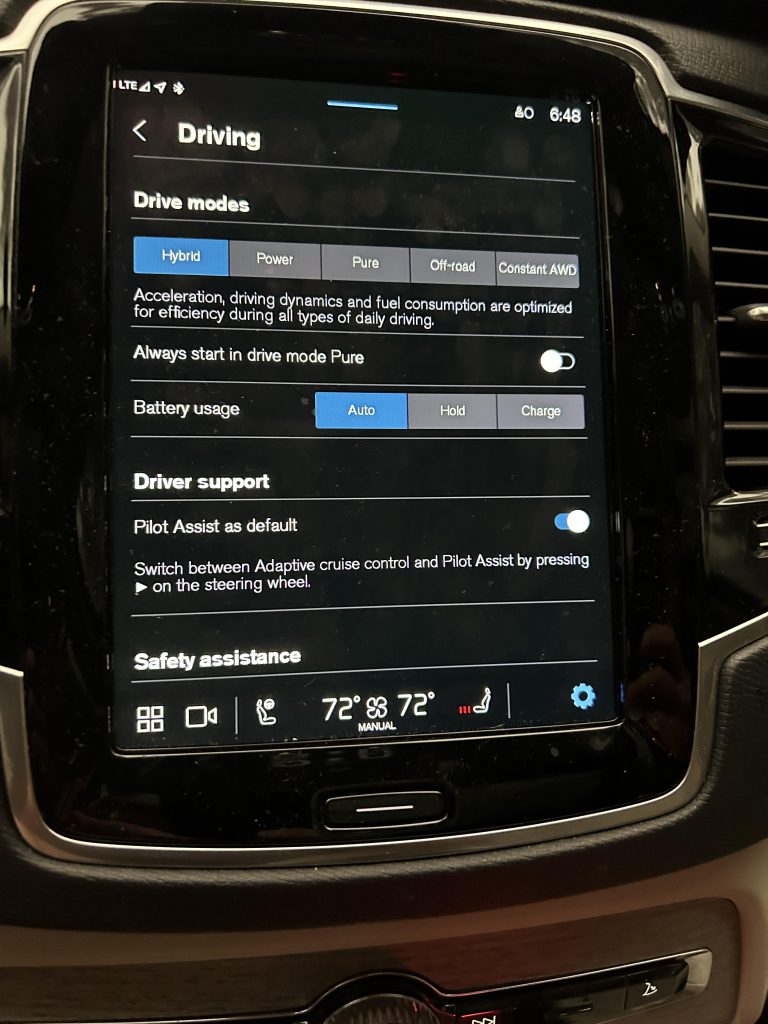
If you’ve ever felt your Volvo XC90 suddenly braking on its own, you’re not alone. That automatic braking feature is designed to keep you safe, but sometimes it can be a bit too cautious for your liking.
You might want to take control and turn off the auto brake to drive the way you prefer. You’ll learn exactly how to disable the auto brake on your Volvo XC90—step by step, simple and clear. Keep reading, and you’ll be back in the driver’s seat with full control in no time.
Credit: www.swedespeed.com
Auto Brake System In Volvo Xc90
The Volvo XC90 comes with an Auto Brake system to help avoid collisions. It uses sensors to detect obstacles ahead.
This system applies brakes automatically if a crash seems likely. It improves safety by reducing accident risks.
Purpose And Benefits
The Auto Brake system aims to protect drivers and passengers. It helps stop or slow the car in emergencies.
Benefits include fewer accidents and less damage. It also lowers injury chances during sudden stops.
- Prevents front-end collisions
- Reduces impact speed
- Increases driver confidence
- Works day and night
When Auto Brake Activates
The system activates when sensors detect a close object ahead. It warns the driver first with alerts.
If the driver does not react, the system applies brakes automatically. This helps avoid or soften a crash.
- Object detected within close range
- Driver does not brake in time
- Speed and distance affect activation
- Works in city and highway driving
Reasons To Disable Auto Brake
The Volvo XC90 has an Auto Brake feature to stop the car automatically. It helps avoid accidents in many cases. Some drivers want to turn it off for certain reasons.
Turning off Auto Brake lets drivers have full control of the vehicle. This can be useful in special situations where the system may act unexpectedly.
Situations Requiring Manual Control
Some road or weather conditions make Auto Brake less reliable. Drivers may want to control braking themselves to avoid problems.
Examples include off-road driving, heavy snow, or steep hills. In these cases, Auto Brake might stop the car too soon or not when needed.
- Driving on gravel or dirt roads
- Deep snow or icy surfaces
- Steep downhill slopes
- Heavy traffic with frequent stops
- During vehicle towing or recovery
Potential Drawbacks Of Keeping It On
Auto Brake is helpful but not perfect. It can cause sudden stops that surprise the driver. This may lead to accidents in some cases.
The system may also brake when no danger exists. This can annoy the driver and reduce confidence in the car. Some drivers find it distracting.
- Unexpected stops in traffic
- False alarms from harmless objects
- Reduced control on slippery roads
- Possible confusion in complex traffic
- Discomfort from sudden braking
Preparing To Turn Off Auto Brake
Turning off the auto brake feature in your Volvo XC90 requires careful preparation. This guide helps you get ready safely and correctly.
Before you start, understand what tools and settings you need. Follow all safety steps to avoid problems.
Safety Precautions
Auto brake helps prevent accidents. Turning it off can increase risk. Always keep safety first.
Make sure you are parked in a safe place before changing any settings. Do not turn off auto brake while driving.
- Park the car on level ground
- Switch off the engine before changing settings
- Keep the parking brake on
- Read your Volvo XC90 manual for warnings
Necessary Tools And Settings
You will need access to your car’s touchscreen and driver menu. No special tools are required beyond this.
Check that your Volvo’s software is up to date. Some models may have different steps depending on the system version.
- Volvo XC90 ignition key or remote
- Access to the center console touchscreen
- Owner’s manual for your specific model
- Stable power supply (car battery charged)
Credit: www.volvocarspalmsprings.com
Step-by-step Guide To Disable Auto Brake
The Volvo XC90 comes with an Auto Brake feature for safety. Some drivers may want to turn it off.
This guide shows how to disable Auto Brake in a few easy steps.
Accessing The Vehicle Settings
First, sit inside your Volvo XC90 and turn on the ignition. The main display screen will light up.
Use the center console knob or touchscreen to open the main menu.
Navigating To Auto Brake Options
From the main menu, find the “Settings” option and select it.
- Scroll to the “Driver Assistance” section.
- Choose “Collision Avoidance.”
- Select “Auto Brake.”
Disabling The Feature
In the Auto Brake menu, you will see an option to enable or disable the feature.
| Option | Description |
| Enable Auto Brake | Activates automatic braking to avoid collisions |
| Disable Auto Brake | Turns off automatic braking feature |
Select “Disable Auto Brake” to turn off the system.
Confirming The Change
A confirmation prompt will appear. Choose “Yes” or “Confirm” to save your settings.
Check the main display to ensure Auto Brake is now off.
Testing And Adjusting After Disabling
After turning off the auto brake on your Volvo XC90, it is important to test and adjust the system. This ensures the vehicle operates safely without the automatic braking feature.
Testing helps confirm that the brakes respond correctly when you apply them manually. Adjusting settings may be necessary to maintain smooth driving performance.
Ensuring Proper Functionality
Check the brake response carefully after disabling auto brake. Pay attention to how the vehicle slows down when you press the brake pedal.
- Drive at a low speed in a safe area.
- Press the brake pedal lightly and feel the brake response.
- Test emergency braking by pressing the pedal firmly.
- Listen for unusual noises from the brake system.
- Check the dashboard for any warning lights.
If you notice any issues, consult your Volvo manual or a professional mechanic. Proper brake function is crucial for your safety.
Re-enabling Auto Brake If Needed
You can turn the auto brake back on if you feel the manual brake control is not enough. Re-enabling the system restores the automatic safety features.
| Method | Details |
| Using the Infotainment Screen | Go to settings > driver support > auto brake and toggle it on. |
| Steering Wheel Controls | Press the menu button, navigate to safety settings, and enable auto brake. |
| Physical Button (if equipped) | Press the auto brake button near the dashboard to turn it on. |
| Consult User Manual | Follow specific instructions for your model year. |
Credit: www.beavertonvolvocars.com
Troubleshooting Common Issues
If you’re driving a Volvo XC90, you might notice the Auto Brake feature. Sometimes, it can be tricky to turn off. This guide will help you troubleshoot common issues.
Learn how to address problems with the Auto Brake not turning off and understand warning lights that may appear.
Feature Not Turning Off
The Auto Brake feature should deactivate when you press the correct button. If it doesn’t, check these common issues.
- Ensure the car is in the correct gear
- Check if the brake pedal is fully released
- Look for any software updates required
Warning Lights And Alerts
Warning lights can indicate an issue with the Auto Brake. Understanding these alerts is important for safety.
| Warning Light | Meaning |
| Red Brake Light | Immediate attention needed |
| Amber Warning Light | Check system soon |
Frequently Asked Questions
How Do I Disable Auto Brake On Volvo Xc90?
To disable auto brake on your Volvo XC90, access the vehicle settings menu. Navigate to the “Safety” or “Driver Assistance” section. Find the “Auto Brake” or “Collision Avoidance” option. Toggle it off to deactivate the system temporarily or permanently.
Can I Turn Off Auto Brake While Driving?
No, the auto brake system cannot be disabled while driving for safety reasons. Adjustments must be made when the vehicle is stationary. This ensures the system remains active to prevent collisions and protect you during unexpected situations.
Will Turning Off Auto Brake Affect Other Safety Features?
Disabling auto brake does not typically affect other safety features like lane assist or blind spot monitoring. However, it reduces your vehicle’s ability to prevent collisions automatically. Always consider the safety implications before turning off this critical feature.
Is It Legal To Disable Auto Brake On Volvo Xc90?
Yes, it is legal to disable auto brake on your Volvo XC90. However, manufacturers recommend keeping it active for safety. Disabling it might affect insurance claims in case of accidents. Check local laws and insurance policies before turning it off.
Conclusion
Turning off the auto brake on your Volvo XC90 is simple and quick. Just follow the steps carefully to keep control. Remember, this feature helps with safety, so use caution when disabling it. Check your settings regularly to ensure everything works right.
Driving safely matters most, no matter the tech in your car. Stay aware and enjoy your ride with confidence.