
Have you ever wished your Tesla’s side mirrors could fold automatically when you park, saving you time and protecting them from damage? Imagine pulling into a tight spot and knowing your mirrors will tuck in on their own—no extra effort needed.
In this guide, you’ll discover simple, step-by-step instructions to set up your Tesla’s auto-folding mirrors. Whether you want to avoid dings in crowded spaces or just enjoy the convenience, learning this quick trick will make your daily drive smoother and stress-free.
Keep reading to unlock the full potential of your Tesla’s smart features!
Benefits Of Auto Folding Mirrors
Auto folding mirrors add smart features to your Tesla. They fold in or out automatically.
This feature helps protect the mirrors and makes parking easier. It also gives a modern look.
Enhanced Vehicle Protection
Auto folding mirrors protect your car from damage. They fold in when parked to avoid bumps.
- Reduce risk of mirror scratches
- Prevent breakage in tight spaces
- Protect against weather elements
Improved Parking Convenience
Folding mirrors make parking simpler in crowded areas. They save space and reduce stress.
| Parking Situation | Benefit of Auto Folding Mirrors |
| Tight garage | Mirrors fold to avoid hitting walls |
| Parallel parking | Less mirror width needed |
| Busy parking lot | Lower chance of mirror damage |
Modern Tech Appeal
Auto folding mirrors add a sleek, high-tech look to your Tesla. They show advanced vehicle features.
Technology helps cars stand out on the road. Auto folding mirrors impress with smooth, quiet movement.
- Automatic response to locking or unlocking
- Seamless integration with car systems
- Easy to use without manual effort
Tesla Models With Auto Fold Feature
Tesla cars have a feature that folds the side mirrors automatically. This helps protect the mirrors when parking or driving through tight spaces.
Not all Tesla models have this feature. Below, you can learn which models support auto folding mirrors and how they work.
Model S
The Model S comes with auto folding mirrors on many versions. The mirrors fold when you lock the car or press the mirror button on the touchscreen.
You can also set the mirrors to fold automatically when driving at low speeds or parking.
Model 3
The Model 3 has power folding mirrors that fold automatically. The mirrors fold when the car is locked or using the app.
This feature helps prevent damage in tight parking spots. You can also control mirror folding from the car’s settings.
Model X
The Model X includes auto folding mirrors on many trims. The mirrors fold when you lock the vehicle or use the touchscreen controls.
They also fold when the car is parked in narrow places to avoid damage.
Model Y
The Model Y features auto folding mirrors that fold when locking the car. You can also fold them manually from the touchscreen.
Auto folding helps protect the mirrors on crowded streets or in garages.
Enabling Auto Fold In Tesla Settings
Auto folding mirrors on your Tesla help protect them when parked. This feature folds the side mirrors automatically. It works through settings on your car’s touchscreen.
Follow these steps to enable and customize the auto fold mirror function. The process is simple and quick to do inside your Tesla’s control menu.
Accessing The Control Menu
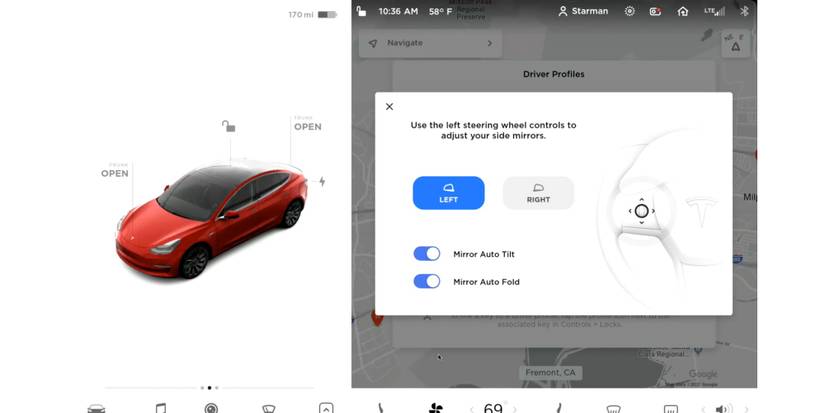
To start, find the Control Menu on your Tesla’s main screen. This menu contains all the car’s settings. You can access it by tapping the car icon at the bottom of the screen.
Inside the Control Menu, look for the section labeled “Mirrors & Steering.” This is where mirror settings are located.
Activating Auto Fold Mirrors
Once inside the “Mirrors & Steering” section, find the option for “Auto Fold Mirrors.” This option controls whether the mirrors fold automatically or not.
- Tap the toggle next to “Auto Fold Mirrors” to turn it on.
- Your mirrors will fold automatically when you lock the car.
- They will unfold when you unlock or start driving.
Customizing Fold Preferences
You can adjust how your mirrors fold by using the fold preferences. These settings let you choose when the mirrors fold and unfold.
| Preference | Description |
| Fold on Lock | Mirrors fold when car is locked |
| Fold on Reverse | Mirrors fold when you reverse |
| Manual Fold | Use the touchscreen or buttons to fold manually |

Credit: www.tesla.com
Using The Tesla Mobile App
The Tesla Mobile App lets you control many features of your car. One useful feature is folding the side mirrors remotely. This helps protect them in tight parking spaces.
With the app, you can fold and unfold your Tesla mirrors anytime. You do not need to be inside the car to use this feature.
Mirror Control Options
You can control the mirrors using the Tesla Mobile App easily. The app shows the current mirror status. It also lets you fold or unfold the mirrors with a tap.
- Open the Tesla Mobile App on your phone.
- Select your vehicle from the home screen.
- Tap the “Controls” menu.
- Find the “Mirrors” section.
- Tap the fold or unfold button to change mirror position.
Remote Folding Features
The app also supports automatic folding when you lock the car. This feature keeps your mirrors safe without extra steps.
| Feature | Description | How to Enable |
| Auto Fold on Lock | Mirrors fold automatically when you lock the car. | Go to Settings > Vehicle > Mirrors > Enable Auto Fold |
| Manual Remote Fold | Fold or unfold mirrors from the app at any time. | Use the fold/unfold button in the Controls menu |
| Auto Unfold on Unlock | Mirrors unfold automatically when you unlock the car. | Enable this in the same Mirror settings menu |
Manual Folding Options
Folding Tesla mirrors manually can be useful in tight spaces. You can adjust them easily using several methods.
This guide covers both physical adjustments and using touchscreen controls for mirror folding.
Physical Mirror Adjustment
Manually folding your Tesla mirrors is straightforward. You can follow these simple steps.
- Locate the mirror housing on the side of the vehicle.
- Gently push the mirror towards the car until it folds.
- Ensure the mirror is securely folded before driving.
Using The Touchscreen Controls
You can fold your mirrors using Tesla’s touchscreen. This feature makes it easier when parking in narrow spaces.
- Access the car’s main menu on the touchscreen.
- Navigate to the ‘Controls’ section.
- Select ‘Quick Controls’ to find the mirror options.
- Tap ‘Fold Mirrors’ to automatically fold them.
Using the touchscreen is convenient and requires no physical effort. Ensure you explore all the options available in the controls menu.
Troubleshooting Auto Fold Issues
Tesla’s auto fold mirrors help protect your side mirrors when parked. Sometimes, these mirrors do not fold automatically as expected.
This guide covers common problems and fixes for auto fold mirrors. It also explains when to contact Tesla support.
Common Problems And Fixes
Auto fold mirrors may fail due to software glitches, settings issues, or hardware problems.
- Mirrors do not fold automatically:Check if auto fold is enabled in your car’s settings under Controls > Quick Controls.
- Delayed folding:Sometimes mirrors fold after a delay. Ensure your car is fully locked to trigger folding.
- Mirrors stuck or jammed:Inspect for dirt or ice blocking mirror movement. Clean and gently adjust if needed.
- Software update needed:Auto fold may not work correctly if software is outdated. Update your vehicle software.
- Battery low:Auto fold might not activate if the battery is very low. Charge your car and try again.
When To Contact Tesla Support
If basic fixes do not solve the problem, contact Tesla support. They can help diagnose hardware or software faults.
| Issue | When to Contact Support |
| Auto fold mirror does not respond after settings check | Contact support for remote diagnostics or service scheduling |
| Physical damage or persistent jamming | Schedule a service appointment for mirror repair or replacement |
| Software update errors related to mirror functions | Reach out to support to assist with update issues |
| Battery or electrical system problems affecting auto fold | Support can advise on battery health and electrical checks |
Additional Tips For Mirror Care
Tesla mirrors need regular care to stay in top condition. With proper maintenance, they will last longer and work better.
Learn how to clean them and protect them in tight spaces. These tips will help keep your Tesla mirrors looking new.
Cleaning And Maintenance
Clean mirrors with soft cloths and gentle cleaners. Avoid harsh chemicals that can damage the surface.
Check mirrors regularly for dirt and debris. Keeping them clean helps maintain visibility and safety.
- Use microfiber cloths for cleaning
- Avoid scrubbing too hard
- Rinse with water after cleaning
Avoiding Damage In Tight Spaces
Fold mirrors in tight spaces to prevent scratches or breaks. This simple step can save you from costly repairs.
Be aware of your surroundings when parking. Narrow spaces can be tricky, so take your time.
- Fold mirrors before entering narrow spaces
- Park with care and check for obstacles
- Adjust mirrors after parking to ensure they unfold properly
Credit: screenrant.com

Credit: www.reddit.com
Frequently Asked Questions
How Do I Enable Auto Folding On Tesla Mirrors?
To enable auto folding, access the vehicle’s touchscreen settings. Navigate to Controls > Quick Controls > Mirrors. Toggle the “Auto-Fold Mirrors” option to activate automatic folding when locking or unlocking the car.
Can I Schedule Tesla Mirrors To Fold Automatically?
Tesla mirrors fold automatically when the car locks or unlocks. Scheduling fold times is not currently available in Tesla’s software settings.
Will Auto Folding Mirrors Improve Parking Safety?
Yes, auto folding mirrors reduce the risk of damage in tight spaces. They protect mirrors from accidental bumps and help save space during parking.
Does Auto Folding Drain Tesla Battery Significantly?
No, the auto folding feature uses minimal power. It only operates briefly during locking and unlocking, making its battery impact negligible.
Conclusion
Auto folding Tesla mirrors saves space and protects your car. It keeps mirrors safe in tight spots. You can fold them with a few simple steps. This feature adds convenience to your daily drive. Try setting up auto fold in your Tesla today.
Enjoy easier parking and less mirror damage. Small changes make a big difference in car care. Keep your Tesla looking sharp and safe. Simple actions, better results.