
If your ABS brakes feel spongy or less responsive, it might be time to bleed them. But did you know that manually bleeding ABS brakes can be tricky and time-consuming?
What if there was a way to make the process easier, faster, and more effective? You’ll discover how to auto bleed your ABS brakes step-by-step. By the end, you’ll have the confidence to get your braking system working smoothly again—saving you time, money, and stress.
Ready to take control of your brake maintenance? Let’s dive in.
Why Bleed Abs Brakes
Bleeding ABS brakes removes air trapped in the brake lines. Air reduces brake fluid pressure. This affects the braking system’s safety and performance.
Regular bleeding keeps the ABS system working correctly. It ensures your brakes respond fast and firm in emergencies.
Signs Of Air In Brake Lines
Air in the brake lines causes several warning signs. Recognizing these signs helps you know when to bleed your ABS brakes.
- Spongy or soft brake pedal feel
- Brake pedal sinks slowly when pressed
- Longer stopping distance than usual
- ABS warning light on the dashboard
- Unusual noises when braking
Impact On Brake Performance
Air bubbles reduce the brake system’s ability to stop the vehicle safely. This table shows how air affects brake fluid and pedal feel.
| Condition | Brake Fluid Pressure | Pedal Feel | Stopping Distance |
|---|---|---|---|
| No Air | High | Firm | Short |
| Small Amount of Air | Medium | Slightly Soft | Moderate |
| Large Amount of Air | Low | Very Soft | Long |

Credit: www.oreillyauto.com
Tools Needed
Auto bleeding ABS brakes requires specific tools. Using the right tools makes the job easier and safer.
This guide covers the essential and optional tools you need for the process.
Essential Brake Bleeding Tools
You need some basic tools to bleed your ABS brakes properly. These tools help remove air from the brake lines.
- Brake Bleeder Kit: Helps push brake fluid through the lines.
- Brake Fluid: Use the type specified in your vehicle’s manual.
- Wrench Set: Needed to open and close bleeder valves.
- Clear Tubing: Connects the bleeder valve to a container to catch fluid.
- Catch Container: Collects old brake fluid safely.
- Jack and Jack Stands: Lift and support the vehicle securely.
- Gloves and Safety Glasses: Protect your hands and eyes from fluid.
Optional Equipment For Abs Systems
ABS systems may require extra tools to work correctly during bleeding. These tools help activate the ABS pump and valves.
- Scan Tool or ABS Bleeding Tool: Activates ABS pump during bleeding.
- Vacuum Pump: Helps remove air when manual bleeding is not enough.
- Pressure Bleeder: Maintains steady pressure to push fluid through the ABS system.
- Brake Fluid Tester: Checks fluid condition before refilling.
Preparing Your Vehicle
Auto bleeding ABS brakes needs careful preparation. You must get your vehicle ready before starting.
Preparing includes checking tools, cleaning parts, and making sure the brake fluid is fresh.
Safety Precautions
Safety is very important when working on brakes. Wear gloves and eye protection to avoid injury.
Make sure the vehicle is on a flat surface. Use wheel chocks to stop it from moving.
- Wear safety gloves and goggles
- Work on a flat, stable surface
- Use wheel chocks to secure the car
- Keep brake fluid away from skin and eyes
- Dispose of old brake fluid properly
Accessing The Brake System
Find the brake fluid reservoir under the hood. Clean the area to stop dirt from entering.
Locate the brake bleeder valves on each wheel. You may need to remove the wheel for easy access.
- Open the hood and find the brake fluid reservoir
- Wipe the reservoir cap clean before opening
- Lift the vehicle safely with a jack and use stands
- Remove wheels to access bleeder valves if needed
Credit: www.youtube.com
Step-by-step Auto Bleeding Process
Auto bleeding ABS brakes helps remove air from the brake lines. Air in the brakes can cause poor brake performance.
This guide shows how to auto bleed ABS brakes safely and correctly using the right tools.
Setting Up The Bleeder Tool
First, connect the bleeder tool to the brake fluid reservoir. Make sure it fits tightly to avoid leaks.
Check the bleeder tool’s fluid level. Fill it with fresh brake fluid if needed. This keeps air from entering the system.
- Attach the bleeder hose to the reservoir securely
- Fill the bleeder tool with clean brake fluid
- Ensure all connections are tight and leak-free
Activating The Abs Pump
Turn the ignition key to the “on” position without starting the engine. This powers the ABS system.
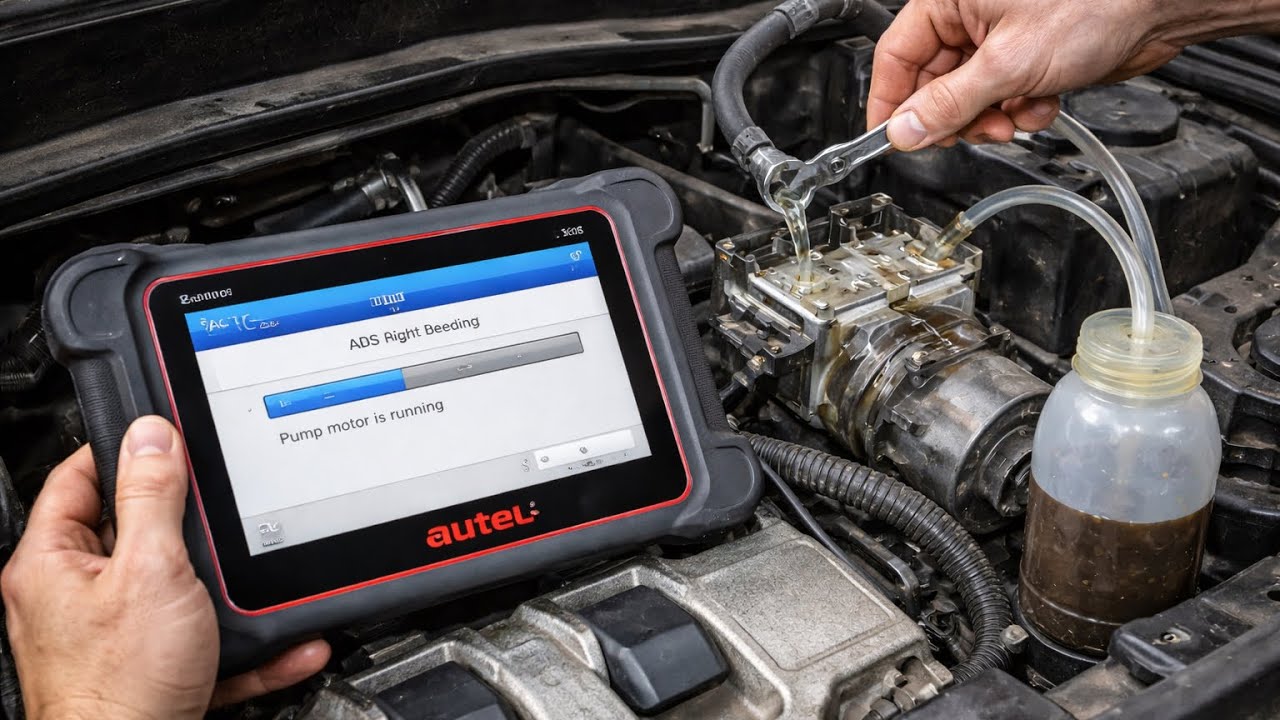
Use a scan tool or ABS bleed function to activate the ABS pump. This moves fluid through the brake lines.
- Turn ignition to “on”
- Connect a scan tool to the vehicle
- Start the ABS pump using the tool’s command
- Listen for the pump running
Bleeding Each Brake Line
Open the bleeder valve on the first brake caliper or wheel cylinder. This lets air and old fluid escape.
Close the valve once fluid flows without air bubbles. Repeat for each brake line in the correct order.
- Start with the brake farthest from the master cylinder
- Open bleeder valve slowly
- Watch for clear fluid without bubbles
- Close valve before moving to next line
Checking For Air Bubbles
Watch the brake fluid carefully as it flows out. Air bubbles show the system still has trapped air.
Repeat bleeding steps if you see bubbles. Clear fluid means the brake lines are free of air.
- Look for continuous fluid flow without bubbles
- Re-bleed lines showing air bubbles
- Ensure all valves are closed tightly
- Check brake pedal feel after bleeding
Common Issues And Fixes
Auto bleeding ABS brakes helps remove air from the brake lines. Air causes soft brakes and poor stopping power. Fixing these problems keeps brakes safe and reliable.
Some issues happen often during bleeding. Knowing how to fix them saves time and effort. Below are common problems and how to solve them.
Abs Warning Light Problems
The ABS warning light may stay on after bleeding brakes. This means the system senses a fault. It could be caused by air or sensor issues.
Check the ABS sensor and wiring first. Clean or replace dirty sensors. If the light stays on, scan the system for error codes. Clearing codes may reset the light.
- Inspect ABS sensor connectors for dirt or damage
- Use a scan tool to read and clear ABS codes
- Make sure brake fluid level is correct
- Re-bleed brakes if air remains in the lines
Persistent Air In Lines
Air can stay trapped in ABS brake lines after bleeding. This causes a spongy brake pedal and poor braking. It is hard to remove air from ABS modules.
Use a scan tool with ABS bleed function. This activates the pump and valves to clear air. Repeat the bleeding process until the pedal feels firm.
- Start bleeding from the wheel farthest from master cylinder
- Keep brake fluid reservoir full during bleeding
- Use ABS bleed mode if available on your scan tool
- Press brake pedal slowly and steadily
- Repeat bleeding until no air bubbles appear

Credit: www.youtube.com
Post-bleeding Checks
After bleeding your ABS brakes, it’s important to check that everything is working well. This ensures safety and performance on the road.
Let’s go through some steps to make sure your brakes are in top condition after bleeding.
Brake Pedal Feel Test
Testing the brake pedal feel is crucial to ensure proper brake function. A firm pedal indicates good bleeding.
- Press the brake pedal with your foot.
- Feel for firmness and responsiveness.
- If the pedal feels spongy, there may be air in the system.
- In such cases, consider re-bleeding the brakes.
Test Drive Tips
Before a long drive, take a short test drive to ensure everything works smoothly. This helps catch any issues early.
- Drive at a slow speed in a safe area.
- Test the brakes by gently applying pressure.
- Listen for unusual sounds or vibrations.
- Ensure the car stops smoothly without pulling to one side.
Frequently Asked Questions
What Is Abs Brake Auto Bleeding?
ABS brake auto bleeding is a process that removes air from the brake system. It uses the vehicle’s ABS module to pump brake fluid. This ensures effective brake performance and safety. The process is quicker and more efficient than manual bleeding.
Why Is Auto Bleeding Abs Brakes Important?
Auto bleeding ABS brakes removes trapped air that can reduce braking efficiency. It restores proper brake pressure. This prevents brake failure and improves vehicle safety. Regular bleeding maintains brake responsiveness and prolongs ABS system life.
Can I Auto Bleed Abs Brakes At Home?
Yes, you can auto bleed ABS brakes at home if you have the right tools. An OBD2 scanner or ABS scan tool is needed. Follow the vehicle’s specific bleeding procedure carefully. Always prioritize safety and consult your vehicle manual.
How Long Does Abs Brake Auto Bleeding Take?
ABS brake auto bleeding usually takes 15 to 30 minutes. The exact time depends on the vehicle model and the bleeding method. Using the ABS module speeds up the process compared to manual bleeding.
Conclusion
Auto bleeding ABS brakes helps keep your car safe and responsive. Follow the steps carefully for best results. Check for air bubbles and brake fluid level often. Clean tools and a steady hand make the job easier. Regular brake maintenance saves time and money.
Trust yourself to do it right. Safe driving starts with good brakes.