Have you ever wished your car could take a little pressure off your feet during stop-and-go traffic? That’s exactly what Auto Brake Hold does for you.
This handy feature keeps your car still even when you lift your foot off the brake pedal, giving you a moment to relax without worrying about rolling backward or forward. If you want to learn how to use Auto Brake Hold easily and safely, keep reading.
By the end of this article, you’ll know exactly how to make your driving smoother and more comfortable every time you hit the road.

Credit: www.youtube.com
What Is Auto Brake Hold
Auto Brake Hold is a safety feature in many modern cars. It keeps the brakes applied even after you release the brake pedal.
This feature helps drivers stop easily in traffic or on hills without holding the brake pedal.
Basic Functionality
Auto Brake Hold activates when you press the brake and stop the car. The system holds the brakes for you.
You can take your foot off the brake pedal, and the car will stay still. The brakes release when you press the gas pedal.
- Stops the car without pressing the brake pedal continuously
- Keeps the car from rolling on hills or in stop-and-go traffic
- Releases brakes automatically when you accelerate
- Enhances driver comfort and control
Common Vehicle Models
Many car brands include Auto Brake Hold in their newer models. It is common in mid to high-end vehicles.
Here are some popular models with this feature:
- Toyota Camry
- Honda Accord
- Ford Escape
- BMW 3 Series
- Mercedes-Benz C-Class
- Hyundai Sonata
Activating Auto Brake Hold
Auto Brake Hold helps keep your vehicle still without pressing the brake pedal. It is useful in stop-and-go traffic or on hills.
This guide explains how to turn on Auto Brake Hold and what to watch for on your dashboard.
Step-by-step Activation
Follow these simple steps to activate Auto Brake Hold in your vehicle.
- Start the engine and make sure your seatbelt is fastened.
- Press the brake pedal firmly and hold it.
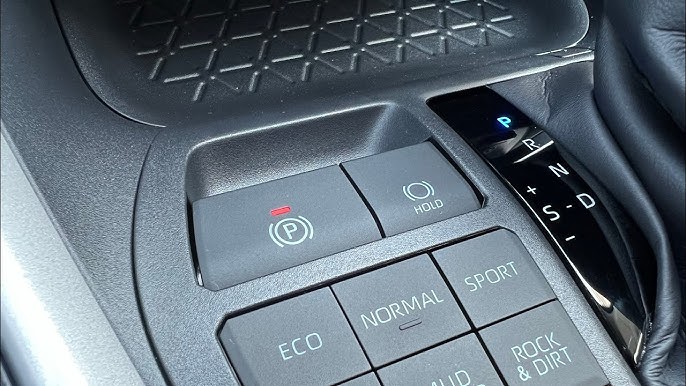
- Locate the Auto Brake Hold button, usually near the gear shift.
- Press the Auto Brake Hold button to turn the system on.
- Release the brake pedal slowly. The brakes will hold the car in place.
- Drive as usual. Auto Brake Hold will engage when the car stops.
- To turn off, press the Auto Brake Hold button again or turn off the engine.
Dashboard Indicators
Your dashboard shows symbols to tell you when Auto Brake Hold is active or off.
| Indicator | What It Means |
|---|---|
| A brake symbol with “HOLD” | Auto Brake Hold is active and holding the brakes. |
| Brake symbol off | Auto Brake Hold is not activated. |
| Warning light | There is a problem with Auto Brake Hold. Check your vehicle manual. |
When To Use Auto Brake Hold
Auto Brake Hold keeps your car still without holding the brake pedal. It helps in many driving situations.
Knowing when to use Auto Brake Hold makes driving easier and safer. This feature works best in certain conditions.
Traffic Stops
Auto Brake Hold is useful at traffic lights and stop signs. It stops your car and holds the brake for you.
You do not need to keep your foot on the brake while waiting. This reduces driver fatigue in heavy traffic.
Hilly Terrain
Use Auto Brake Hold on hills to prevent rolling backward. It keeps your car steady when you stop uphill.
This feature helps when starting on a slope. It gives you time to switch from brake to gas safely.
Stop-and-go Driving
Auto Brake Hold works well in slow, stop-and-go traffic. It stops and holds the car each time you pause.
You avoid holding the brake pedal for long periods. This makes traffic jams less tiring and stressful.
Safety Benefits
Auto Brake Hold is a feature that keeps your car still without pressing the brake. It helps you stay safe in traffic and on hills.
This feature reduces accidents and makes driving easier by controlling the brakes automatically.
Preventing Rollbacks
Auto Brake Hold stops your car from rolling backward on hills. This prevents crashes and keeps you safe.
You can focus on moving forward without worrying about your car slipping back.
- Holds brakes after stopping on an incline
- Releases brakes when you press the gas pedal
- Prevents accidents caused by rollbacks
Reducing Driver Fatigue
Auto Brake Hold reduces the need to keep your foot on the brake. This helps you feel less tired during stop-and-go traffic.
You can relax your foot while the car stays still, making long drives safer and more comfortable.
Common Misconceptions
Many drivers are unsure about how the Auto Brake Hold feature works. Some think it replaces other car functions. Others worry it might affect fuel use.
This section clears up common myths about Auto Brake Hold. It explains what this feature can and cannot do.
Does It Replace The Parking Brake?
Auto Brake Hold helps keep your car still when you stop. But it does not take the place of the parking brake. The parking brake is still needed for parking on slopes or long stops.
- Auto Brake Hold keeps the car from rolling temporarily at traffic lights or stops.
- The parking brake locks the wheels to keep the car stationary for longer times.
- Always use the parking brake when parking on hills or leaving the car.
- Do not rely on Auto Brake Hold as a safety measure for parked cars.
Impact On Fuel Efficiency
Some people think Auto Brake Hold uses more fuel. This is not true. The system does not change how the engine burns fuel during stops.
| Myth | Fact |
|---|---|
| Auto Brake Hold increases fuel use. | The system does not affect fuel consumption. |
| It keeps the engine running longer than normal. | Engine idling time stays the same with or without Auto Brake Hold. |
| Using Auto Brake Hold drains the battery quickly. | The system uses minimal power and does not drain the battery noticeably. |

Credit: ownersmanual.kia.com
Troubleshooting Issues
Auto Brake Hold is a helpful feature in modern vehicles. It keeps your car stationary without needing to hold the brake pedal. Sometimes, this feature may not engage as expected.
Understanding common issues can help you troubleshoot problems effectively. Below are some tips to ensure your Auto Brake Hold works smoothly.
When Auto Brake Hold Doesn’t Engage
There are several reasons why Auto Brake Hold might not engage. It is important to identify the cause to fix it properly.
- Check if your seatbelt is fastened. The system might require it to be engaged.
- Ensure the car is in drive mode. Some vehicles need this to activate the feature.
- Look for warning lights on the dashboard. They can indicate specific issues.
Maintenance Tips
Regular maintenance can prevent issues with Auto Brake Hold. Follow these tips to keep it in good condition.
| Maintenance Task | Frequency |
| Brake Fluid Check | Every 6 months |
| Software Update | Annually |
| System Diagnostics | Every 2 years |
By following these troubleshooting and maintenance tips, you can ensure your Auto Brake Hold operates efficiently.
Enhancing Convenience
Auto Brake Hold is a helpful feature in modern cars. It keeps the car stationary without holding the brake pedal. This function adds ease to driving, especially in traffic.
Using Auto Brake Hold saves effort. Drivers can relax their feet during long stops. This feature is useful at traffic lights or in traffic jams.
Combining With Other Safety Features
Auto Brake Hold works well with other safety features. It can be part of a car’s safety system. This makes driving safer and more comfortable.
Features like Anti-lock Braking System (ABS) and Traction Control improve safety. When combined, they help prevent accidents. Auto Brake Hold adds to this safety net.
- ABS prevents wheels from locking.
- Traction Control reduces wheel spin.
- Auto Brake Hold keeps the car steady.
Customizing Settings
Drivers can adjust Auto Brake Hold settings. This allows them to use the feature to suit their needs. Customization improves the driving experience.
Some cars offer different modes. Drivers can choose how Auto Brake Hold behaves. This makes the feature flexible and user-friendly.
- Adjust sensitivity levels.
- Choose automatic or manual activation.
- Set duration for holding the brakes.

Credit: www.nissan.co.uk
Frequently Asked Questions
What Is Auto Brake Hold And How Does It Work?
Auto Brake Hold automatically keeps your vehicle stationary without pressing the brake pedal. It activates when you stop and releases when you press the accelerator. This feature enhances convenience and reduces driver fatigue in stop-and-go traffic or at traffic lights.
When Should I Use Auto Brake Hold In My Car?
Use Auto Brake Hold during stop-and-go traffic, at traffic lights, or on uphill stops. It prevents the car from rolling back and reduces the need to keep your foot on the brake. This improves safety and driving comfort.
Does Auto Brake Hold Work On All Road Types?
Auto Brake Hold works on most road surfaces, including flat and inclined roads. However, it is less effective on slippery or icy roads. Always drive cautiously and use the feature as a convenience, not a substitute for safe driving.
Can Auto Brake Hold Affect Fuel Efficiency?
Auto Brake Hold has minimal impact on fuel efficiency. It mainly manages the braking system without increasing engine load. Using it properly helps reduce fuel wastage during frequent stops without compromising vehicle performance.
Conclusion
Auto Brake Hold helps you stop without keeping your foot on the brake. It makes driving in traffic easier and less tiring. Use it on hills or in stop-and-go traffic for safety. Always check your car’s manual to understand how it works.
Practice using it in a safe area before driving in busy places. This feature adds comfort but does not replace careful driving. Stay alert and drive safely every time you use Auto Brake Hold.