
Are you tired of constantly adjusting your car’s temperature while driving? Auto climate control can make your rides more comfortable without the hassle.
Imagine setting your ideal temperature once and letting your car do the rest. Sounds easy, right? In this guide, you’ll learn exactly how to use auto climate control to keep your cabin just right, no matter the weather outside. Keep reading, and you’ll discover simple tips that can make every drive more enjoyable and stress-free.
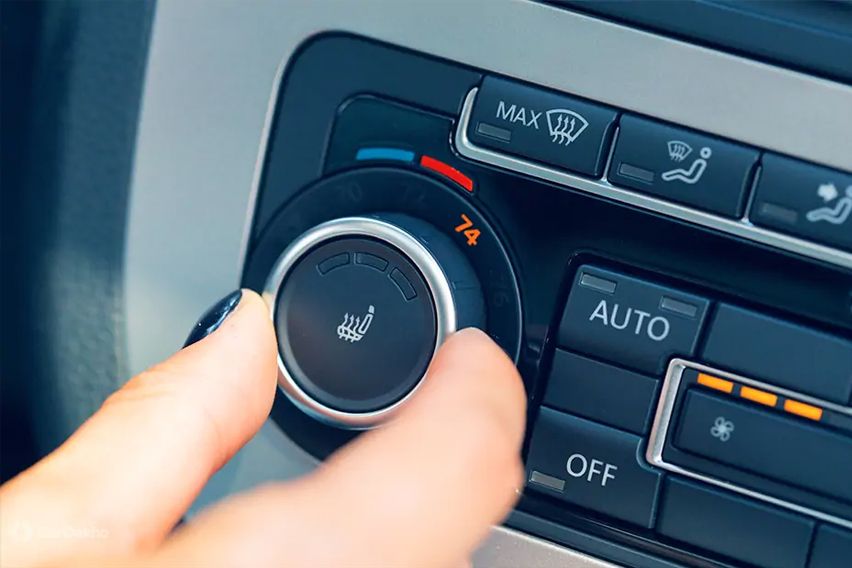
Credit: www.oto.com.sg
Basics Of Auto Climate Control
Auto climate control helps keep your car’s inside temperature comfortable. It adjusts heat and air conditioning automatically. This system uses sensors and parts to manage the air.
Understanding how auto climate control works can help you use it better. It makes driving more pleasant by keeping the air just right.
What Auto Climate Control Does
Auto climate control keeps the car’s cabin at a set temperature. It changes the fan speed and air flow to match the desired comfort. It can also control air quality inside the car.
- Maintains a steady temperature inside the car
- Adjusts fan speed automatically
- Controls air flow direction
- Filters outside air to reduce dust and odors
- Prevents windows from fogging up
Key Components And Sensors
The system uses parts and sensors to control the temperature. These parts work together to make quick changes to the air inside the car.
| Component | Function |
|---|---|
| Temperature Sensor | Measures cabin temperature |
| Sunlight Sensor | Detects sunlight intensity |
| Humidity Sensor | Checks moisture levels inside |
| Control Unit | Processes sensor data and controls the system |
| Blower Fan | Moves air through vents |
| Air Mix Door | Adjusts hot and cold air blend |
Setting Up Your System
Auto climate control makes your car comfortable by adjusting settings automatically. Setting it up right helps you enjoy a pleasant ride.
Learn how to adjust temperature, choose fan speeds, and use auto mode for the best experience.
Adjusting Temperature Settings
Start by selecting your preferred temperature. Use the control panel or touchscreen to set the temperature higher or lower. The system will keep the cabin at this temperature.
Keep in mind that setting the temperature too low or high may cause the system to work harder.
Choosing Fan Speeds
Fan speed controls how much air flows inside the car. You can set it manually or let the system decide.
- Low speed: Quiet and gentle airflow
- Medium speed: Balanced airflow and noise
- High speed: Fast cooling or heating
- Auto fan: System adjusts speed automatically
Using Auto Mode Effectively
Auto mode keeps your car comfortable by adjusting temperature and fan speed. It reacts to outside weather and cabin conditions.
| Auto Mode Feature | Benefit |
| Temperature Control | Keeps cabin at set temperature |
| Fan Speed Adjustment | Changes speed based on temperature needs |
| Airflow Direction | Redirects air for best comfort |
| Humidity Control | Reduces window fogging |
Optimizing Comfort
Auto climate control helps keep your car comfortable without constant adjustments. It works by balancing temperature, humidity, and airflow inside the vehicle.
Using it correctly can make your ride more pleasant in all weather conditions.
Balancing Temperature And Humidity
Set the temperature to a level that feels comfortable but not too cold or hot. The system adjusts humidity to avoid dryness or dampness inside the car.
- Choose a moderate temperature around 70°F (21°C).
- Use the auto mode to maintain steady humidity levels.
- Turn on the air conditioning to reduce humidity in hot weather.
- Use the heater with the defroster to clear windows and keep air dry in cold weather.
Managing Airflow Direction
Directing airflow properly improves comfort and prevents fogging on windows. Use the controls to choose where air flows inside the car.
| Airflow Setting | Best Use |
| Face level vents | Cool or warm air directly to passengers |
| Foot level vents | Keep feet warm, especially in cold weather |
| Defrost vents | Clear windshield and front windows |
| Mixed vents | Even distribution for overall comfort |
Dealing With Sunlight And Weather Changes
Sunlight and outside weather affect the cabin temperature. The auto climate system adjusts to keep comfort steady.
Use these tips to handle changing conditions:
- Close sunroof or windows during strong sunlight to reduce heat.
- Use the recirculation mode to keep cool air inside on hot days.
- Switch to fresh air mode when outside air is cooler or fresher.
- Adjust the temperature slightly to match outside weather changes.

Credit: www.bmwblog.com
Energy Efficiency Tips
Auto climate control in your vehicle can save energy. It keeps the cabin comfortable while using less power.
Understanding how to use it properly can lead to better energy savings. Here are some tips for efficient use.
Using Recirculation Mode
Recirculation mode reuses the air inside the car. This can help cool the car faster on hot days.
- Use recirculation mode when the air outside is hot.
- Turn it off to bring in fresh air after the cabin is cool.
- Helps in reducing the load on the air conditioning system.
When To Turn Off Auto Climate Control
Sometimes, turning off auto climate control can save more energy. Manual control can be more efficient in mild weather.
Consider the outside temperature. Turn off the system when the weather is pleasant to avoid unnecessary energy use.
Maintaining Your System For Efficiency
Regular maintenance keeps your climate control system running smoothly. A well-maintained system uses less energy.
| Maintenance Task | Frequency |
| Check Air Filters | Every 6 months |
| Inspect Vents | Yearly |
| Service System | Every 2 years |
Troubleshooting Common Issues
Auto climate control helps keep your car comfortable. Sometimes it may not work right. This guide shows how to fix common problems.
Use these tips to solve issues quickly and enjoy a better driving experience.
Auto Mode Not Responding
If the auto mode does not respond, check if the system is turned on. Sometimes the controls may freeze or lag.
- Restart the car’s engine and try again.
- Check the fuse related to the climate control system.
- Look for any error messages on the display.
- Make sure sensors near vents are clean and not blocked.
- If the problem stays, visit a service center for help.
Uneven Temperature Distribution
Uneven temperature means some parts of the car feel too hot or cold. This can happen if vents are closed or blocked.
| Cause | How to Fix |
| Blocked air vents | Clear any objects or dust from vents |
| Faulty blower fan | Have a mechanic check or replace the fan |
| Incorrect sensor reading | Clean or recalibrate sensors |
| Damaged ductwork | Inspect and repair any leaks or breaks |
Strange Noises Or Odors
Unusual sounds or smells from the climate control may mean a problem with the system’s parts or filters.
- Noise like rattling or buzzing may come from loose parts or a worn fan.
- Musty odors often mean a dirty cabin air filter.
- Burning smells could signal electrical issues or overheating components.
- Regularly replace air filters to keep air clean.
- Get strange noises checked by a professional as soon as possible.

Credit: www.reddit.com
Advanced Features To Explore
Auto climate control systems offer more than basic temperature settings. They help you enjoy better comfort and efficiency in your vehicle.
Learning about advanced features lets you use your system fully. This guide covers key options to try out.
Dual-zone And Multi-zone Controls
Dual-zone and multi-zone controls let passengers set different temperatures. This helps everyone feel comfortable during the ride.
- Driver and front passenger can choose separate temperatures
- Rear passengers may have their own climate controls
- Zones work independently for heating and cooling
- Adjust fan speed and air direction per zone
- Some systems allow syncing zones with one control
Integration With Smart Devices
Many auto climate systems connect to smartphones or smart home devices. This feature adds convenience and control.
| Feature | Benefit |
| Mobile app control | Change settings before you enter the car |
| Voice commands | Adjust temperature hands-free |
| Smart home linking | Sync car climate with home climate |
| Remote alerts | Know if temperature changes unexpectedly |
Seasonal And Personalized Settings
Seasonal and personalized settings let you save climate preferences for different times and users. This saves time and keeps comfort consistent.
Common personalized and seasonal features include:
- Preset modes for summer, winter, and spring
- User profiles that store preferred temperatures
- Automatic adjustment based on outside weather
- Memory settings for fan speed and airflow
Frequently Asked Questions
What Is Auto Climate Control In Cars?
Auto climate control automatically adjusts temperature and airflow for comfort. It uses sensors to maintain the desired cabin climate without manual settings.
How Do I Set The Temperature In Auto Climate Control?
Simply select your preferred temperature on the control panel. The system will regulate heating or cooling to maintain that exact temperature.
Can Auto Climate Control Improve Fuel Efficiency?
Yes, by optimizing HVAC use, it reduces engine load. Efficient temperature management can lower fuel consumption compared to manual settings.
How Does Auto Climate Control Handle Humidity?
It monitors humidity levels and adjusts airflow and temperature. This helps prevent windshield fogging and keeps the cabin comfortable.
Conclusion
Auto climate control makes driving more comfortable and easy. It keeps the car temperature just right without constant adjustments. Using it saves time and helps you focus on the road. The system adjusts air flow and heat automatically. Understanding its basic functions improves your driving experience.
Try setting your preferred temperature and let the system work. Enjoy a smooth and pleasant ride every time you drive. Simple and smart.